Geospatial data
QuestDB adds support for working with geospatial data through a geohash type.
This page describes how to use geohashes, with an overview of the syntax,
including hints on converting from latitude and longitude, inserting via SQL,
InfluxDB line protocol, and via Java embedded API.
To facilitate working with this data type, spatial functions and operators have been added to help with filtering and generating data.
Geohash description#
A geohash is a convenient way of expressing a location using a short alphanumeric string, with greater precision obtained with longer strings. The basic idea is that the Earth is divided into grids of defined size, and each area is assigned a unique id called its Geohash. For a given location on Earth, we can convert latitude and longitude as the approximate center point of a grid represented by a geohash string. This string is the Geohash and will determine which of the predefined regions the point belongs to.
In order to be compact, base32 is used as a representation of Geohashes, and is therefore comprised of:
- all decimal digits (0-9) and
- almost all of the alphabet (case-insensitive) except "a", "i", "l", "o".
The following figure illustrates how increasing the length of a geohash result in a higher-precision grid size:
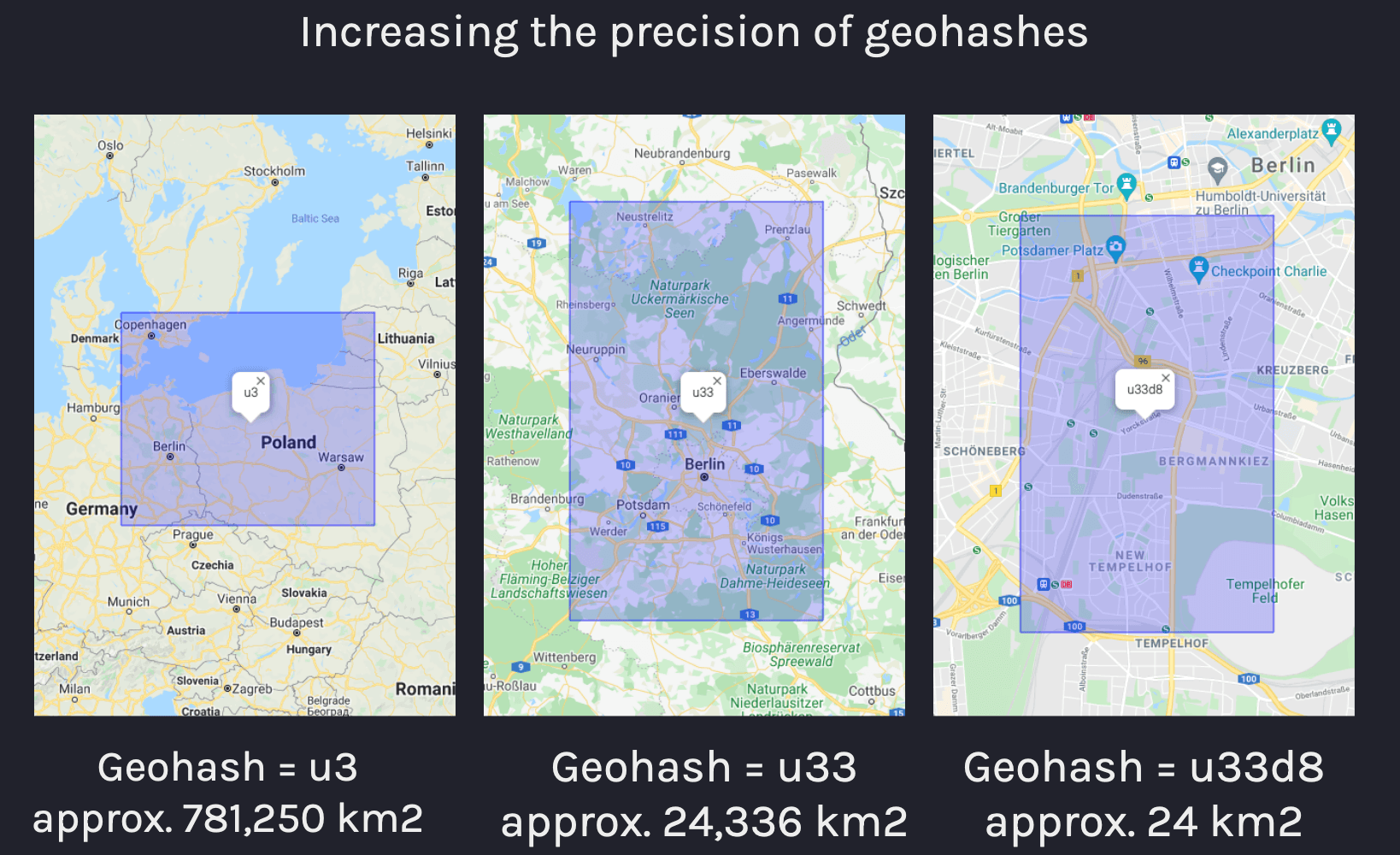
QuestDB geohash type#
Geohash column types are represented in QuestDB as geohash(<precision>).
Precision is specified in the format n{units} where n is a numeric
multiplier and units may be either c for char or b for bits (c being
shorthand for 5 x b).
The following example shows basic usage of geohashes by creating a column of 5
char precision, 29 bits of precision, and inserting geohash values into these
columns:
It's not possible to store variable size geohashes within a column, therefore
the size and precision of a geohash must be known beforehand. Shorter-precision
geohashes cannot be inserted into longer-precision columns as all bits are
significant. Details on the size of geohashes is described in the
geohash precision section below. Additionally,
NULL is supported as a separate value for geohash columns of all precision.
Geohash literals#
Geohashes have a literal syntax which starts with the hash # symbol followed
by up to 12 chars, i.e.:
Geohash literals with a single hash (#) may include a suffix in the format
/{bits} where bits is the number of bits from 1-60 to allow for further
granularity of the geohash size. This is useful if a specific precision is
desired on the column size, but the values being inserted are using a char
notation:
The binary equivalent of geohashes may be expressed with two hash symbols (##)
followed by up to 60 bits:
Implicit casts from strings to literal geohashes is possible, but less efficient as string conversion to geohash must be performed:
NULL values reserve 1 bit which means 8-bit geohashes are stored in 9-bits as
shorts internally.
Specifying geohash precision#
The size of the geohash type may be:
- 1 to 12 chars or
- 1 to 60 bits
The following table shows all options for geohash precision using chars and
the calculated area of the grid the geohash refers to:
| Type | Example | Area |
|---|---|---|
geohash(1c) | #u | 5,000km × 5,000km |
geohash(2c) | #u3 | 1,250km × 625km |
geohash(3c) | #u33 | 156km × 156km |
geohash(4c) | #u33d | 39.1km × 19.5km |
geohash(5c) | #u33d8 | 4.89km × 4.89km |
geohash(6c) | #u33d8b | 1.22km × 0.61km |
geohash(7c) | #u33d8b1 | 153m × 153m |
geohash(8c) | #u33d8b12 | 38.2m × 19.1m |
geohash(9c) | #u33d8b121 | 4.77m × 4.77m |
geohash(10c) | #u33d8b1212 | 1.19m × 0.596m |
geohash(11c) | #u33d8b12123 | 149mm × 149mm |
geohash(12c) | #u33d8b121234 | 37.2mm × 18.6mm |
For geohashes with size determined by b for bits, the following table compares
the precision of some geohashes with units expressed in bits compared to chars:
| Type (char) | Equivalent to |
|---|---|
geohash(1c) | geohash(5b) |
geohash(6c) | geohash(30b) |
geohash(12c) | geohash(60b) |
Casting geohashes#
Explicit casts are not necessary, but given certain constraints, it may be
required to cast from strings to geohashes. Empty strings are cast as null for
geohash values which are stored in the column with all bits set:
It may be desirable to cast as geohashes in the circumstance where a table with
a desired schema should be created such as the following query. Note that the
use of WHERE 1 != 1 means that no rows are inserted, only the table schema is
prepared:
Geohash types can be cast from higher to lower precision, but not from lower to higher precision:
SQL examples#
The following queries create a table with two geohash type columns of varying
precision and insert geohashes as string values:
Larger-precision geohashes are truncated when inserted into smaller-precision columns, and inserting smaller-precision geohases into larger-precision columns produces an error, i.e.:
Performing geospatial queries is done by checking if geohash values are equal to or within other geohashes. Consider the following table:
This creates a table with a symbol type column as an identifier and we can
insert values as follows:
This table contains the following values:
| ts | device_id | g1c | g8c |
|---|---|---|---|
| 2021-09-02T14:20:04.669312Z | device_1 | u | u33d8b12 |
| 2021-09-02T14:20:06.553721Z | device_1 | u | u33d8b12 |
| 2021-09-02T14:20:07.095639Z | device_1 | u | u33d8b18 |
| 2021-09-02T14:20:07.721444Z | device_2 | e | ezzn5kxb |
| 2021-09-02T14:20:08.241489Z | device_1 | u | u33d8b1b |
| 2021-09-02T14:20:08.807707Z | device_2 | e | ezzn5kxc |
| 2021-09-02T14:20:09.280980Z | device_3 | e | u33dr01d |
We can check if the last-known location of a device is a specific geohash with the following query which will return an exact match based on geohash:
| ts | device_id | g1c | g8c |
|---|---|---|---|
| 2021-09-02T14:20:09.280980Z | device_3 | e | u33dr01d |
First and last functions#
The use of first() and last() functions within geospatial queries has been
significantly optimized so that common types of queries relating to location are
improved. This means that queries such as "last-known location" by indexed
column for a given time range or sample bucket is specifically optimized for
query speed over large datasets:
Within operator#
The within operator can be used as a prefix match to evaluate if a geohash is
equal to or is within a larger grid.
It can only be applied in LATEST ON queries and all symbol
columns within the query must be indexed.
The following query will return the most
recent entries by device ID if the g8c column contains a geohash within
u33d:
| ts | device_id | g1c | g8c |
|---|---|---|---|
| 2021-09-02T14:20:08.241489Z | device_1 | u | u33d8b1b |
| 2021-09-02T14:20:09.280980Z | device_3 | e | u33dr01d |
For more information on the use of this operator, see the spatial operators reference.
Java embedded usage#
Geohashes are inserted into tables via Java (embedded) QuestDB instance through
the selected Writer's putGeoHash method. The putGeoHash method accepts
LONG values natively with the destination precision. Additionally,
GeoHashes.fromString may be used for string conversion, but comes with some
performance overhead as opposed to long values directly.
Depending on whether the table is a WAL table or not, the following components may be used:
TableWriteris used to write data directly into a table.WalWriteris used to write data into a WAL-enabled table via WAL.TableWriterAPIis used for both WAL and non-WAL tables, as it requests the suitableWriterbased on the table metadata.
Reading geohashes via Java is done by means of the following methods:
Record.getGeoByte(columnIndex)Record.getGeoShort(columnIndex)Record.getGeoInt(columnIndex)Record.getGeoLong(columnIndex)
Therefore it's necessary to know the type of the column beforehand through column metadata by index:
Invoking the method above will return one of the following:
ColumnType.GEOBYTEColumnType.GEOSHORTColumnType.GEOINTColumnType.GEOLONG
For more information and detailed examples of using table readers and writers, see the Java API documentation.
InfluxDB Line Protocol#
Geohashes may also be inserted via InfluxDB Line Protocol (ILP) by the following steps:
- Create a table with columns of geohash type beforehand:
- Insert via ILP using the
geohashfield:
note
The ILP parser does not support geohash literals, only strings. This means that
table columns of type geohash type with the desired precision must exist
before inserting rows with this protocol.
If a value cannot be converted or is omitted it will be set as NULL
Inserting geohashes with larger precision than the column it is being inserted
into will result in the value being truncated, for instance, given a column with
8c precision:
CSV import#
Geohashes may also be inserted via REST API. In order to perform inserts in this way;
- Create a table with columns of geohash type beforehand:
Note that you may skip this step, if you specify column types in the schema
JSON object.
- Import the CSV file via REST API using the
geohashfield:
The tracking.csv file's contents may look like the following:
Just like ILP, CSV import supports geohash strings only, so the same restrictions apply.
The PostgreSQL wire protocol#
Geohashes may also be used over Postgres wire protocol as other data types. When querying geohash values over Postgres wire protocol, QuestDB always returns geohashes in text mode (i.e. as strings) as opposed to binary
The Python example below demonstrates how to connect to QuestDB over postgres wire, insert and query geohashes. It uses the psychopg3 adapter.
To install psychopg3, use pip: